Showing posts with label library resources. Show all posts

Monday, August 7, 2017

Open Access eBooks on JSTOR!


Over 600+ Open Access eBooks, from esteemed presses such as University of California Press and University of Michigan Press, are available on JSTOR!


The content is available to anyone for use and there are no limits on PDF downloads or printing!

Wednesday, August 31, 2016

ALTA Religion Database with ALTASerials

Product banner image
We are pleased to announce that ALTA Religion Database with ATLASerials is now available!!Produced by the American Theological Library Association (ALTA), this database provides coverage dating back to 1908 with indexing for some journal titles extending back into the 19th century. Full-text journal articles and reviews are selected for inclusion by leading religion scholars.

Content includes:
  • Full-text articles and reviews from more than 300 journals
  • More than 1.8 million records
  • Indexing of more than 1,800 journals, over 640 of which are currently being indexed
  • More than 667,400 journal article records, 267,400 essay records, 607,500 review records, and 300,500 book records.
ALTA Religion Database with ATLASerials can be accessed through the EBSCO All Databases list or searched through EBSCO Discovery.

Wednesday, August 17, 2016

DynaMed Plus


We are pleased to announce that DynaMed was upgraded to DynaMed Plus!! DynaMed Plus provides instant access to the most current clinical evidence and gives answers to the clinical questions quickly and easily. For precise search results, they offer auto-suggest, direct-to-section search results, summary display, and access to relevant images and calculators. DynaMed Plus includes specialty content in the 22 areas such as allergy, cardiology, critical care, etc. DynaMed Plus is also available on tablets or smartphone (iPhone, iPad or Android devices).


Wednesday, February 3, 2016

R2 Digital Library


We are pleased to introduce a new eBook platform---R2 Digital Library!! The R2 Digital Library offers comprehensive health science collections of medical, nursing and allied health eBooks from key health science publishers.

Thursday, January 21, 2016

Library Curriculum Builder for Moodle


We are pleased to introduce Library Curriculum Builder!! It is a new plugin tool for Moodle that allows instructors to provide access to assigned class readings while maintaining copyright compliance by linking directly from a Moodle course to journal articles, ebooks, and other online resources in our library's databases.

Thursday, January 7, 2016

A New Journal Package Arrived!!


We are pleased to announce that the College Library has access to a new journal package; LWW (Lippincott Williams & Wilkins) Nursing and Health Professions Premier Collection. The collection can be searched in EBSCO Discovery or browsed and searched through the "Ovid/Lippincott Journals" link in the Portal (Library Resources - Research).

The collection of top nursing journals used by nurses, nursing students and health professionals, includes the following titles.

Wednesday, September 23, 2015

New EBSCO eBook Viewer


We are pleased to introduce the new EBSCO eBook Viewer!! When you discover and download EBSCO eBooks, the new viewer provides features:
  • Support for scrolling through the entire eBook to find relevant information
  • Collapsible side panel that brings content front and center
  • Support for your needs with cite, note, export and dictionary tools
  • Email and save tools that enable you to take chapters or pages directly to the viewer
  • Quick access to download the entire eBook for further reading
  • Growing number of titles available in both PDF and EPUB formats.


Tuesday, August 25, 2015

Nursing Reference Center Plus Mobile App


The College Library is pleased to introduce the new Nursing Reference Center Plus Mobile App!!

The app provides:
  • Information about diseases and conditions
  • Evidence-base care sheets
  • Content on nursing best practices and skills
  • Robust drug information
  • Videos and images to aid in patient care
With features meeting the needs:
  • Bookmarking favorite topics and searches
  • Viewing recent search history
  • Ability to save notes on favorite topics
  • Print and email content directly from a device
  • Fast download
 
The app can be downloaded from the iTunes app store for iPhone, iPad, and iPod Touch, and Google Play for Android devices.

User Guides

Monday, August 17, 2015

EBSCO Discovery Full Text Finder

The College Library is pleased to introduce EBSCO Discovery Full Text Finder!!

 
Full Text Finder, replacing the A-Z List, is a highest level of publication search service to deliver the full text to you. For an easy and time-saving navigation to publications, Full Text Finder provides new features like a responsive auto-complete function and a simplified subject browser. You can also directly find out the full text within a publication title or narrow down search results using limiters.

User Guides 
Tutorial

Friday, July 10, 2015

Associated Press Video Collection Coming Soon!!


The College Library is pleased to introduce Associated Press(AP) Video Collection!! The collection of 60,000 videos from the AP, the world's leading news agency, includes primary source footage from 1930 through the present and editorially produced videos. The collection is updated monthly with 300 new videos and covers a variety of topics studied in schools and colleges. Users can find videos about current and historical events, famous people(political leaders, celebrities and athletes), art, music, literature, science, and technology.

The AP videos will begin appearing in the search results on or after August 1, 2015. When a search is conducted in Explora, EBSCOhost or EBSCO Discovery Service, a search results list will display with related articles, books, e-books, etc. If videos related to the search terms are available, a video carousel will also show between the second and third search results.

User Guides

Thursday, October 23, 2014

New & Available Now - STAT!Ref


 Click here for more info

The College Library is pleased to introduce a new e-resource called STAT!Ref. STAT!Ref enables you to cross-search full-text titles, journals and evidence-based point-of-care authoritative resources. With 400+ and growing resources within over 50 healthcare disciplines, STAT!Ref provides the latest healthcare information in a customizable and convenient format. STAT!Ref is accesible by desktop, laptop and wireless or web-enabled mobile devices.

The FREE STAT!Ref Mobile App takes your healthcare e-sources on the go with powerful interactive functionality. This app is available for iPhone/iPad, Android, and BlackBerry. Click HERE for an instructional video, handouts and links.

Tutorials
Quick Guides
How to get to it
  • Log into Portal
  • Click the icon labled "Connect to Library Databases" (blue cylinder in Launch Pad)
  • Choose "STAT!Ref - for Point of Care" under E-Reference

Thursday, September 11, 2014

Upgraded Nursing Resource - Nursing Reference Center Plus


The College Library is pleased to announce that we have upgraded from our current basic Nursing Reference Center to Nursing Reference Center Plus. Nursing Reference Center Plus is an evidence-based information resource focusing on ensuring that staff nurses, nurse educators, nursing residents, and nursing students have quick and easy access to the most current information to provide the best care possible to their patients.

Features will be added:
  • Core measures topics
  • Guidelines on best practices
  • Nursing care plans
  • Nursing management & leadership topics
  • Regulary & risk management topics
  • Videos & images
  • Continuing education modules
  • Easy access to patient education handouts
  • Nursing skills checklists
  • Nursing e-books
More Info


To access the Library's electronic resources;
  • Log in to Portal.
  • Click the "Connect to Library Databases" (blue cylinder icon) from the Launch Pad, then select the resources you need from the list.
  • OR
  • Click the "College Library" (books icon) form the Launch Pad, then click the labeled "Library Resources-Research". Then select the resources you need from the list.

Monday, April 2, 2012

Database Access Change

As of March 30th, the electronic resources - specifically the databases for finding academic journal articles - are now only available through the Portal.

To access the databases, log in through the Portal (same as you do for Moodle) and you'll see an area to the left called the dashboard.  In this icon clump there will be an icon with mouseover text that reads: “Connect to Library Databases.”  The icon looks like three blue stacked disks.  Click there to gain access to the library databases.  It no longer matters if you are on or off campus for database access, the way to get on is the same.

If you are having trouble accessing your Portal account for any reason, please contact IT by emailing portal@ololcollege.edu or by calling 225-768-1720.

Good luck on exams!  And have a great spring break next week. :)

Thursday, February 9, 2012

Nursing Education in Video Now Available

Nursing Education in Video is now available on a trial basis from computers on campus. It would be extra helpful if students and faculty could take a peek at these video offerings and let the library know what you think about them.

From the Nursing Education in Video website:
Nursing Education in Video is a unique online collection of videos created specifically for the education and training of nurses, nursing assistants, and other healthcare workers. All of the videos in the collection have been created with the guidance of the Medcom-Trainex advisory board, and are regularly reviewed for accuracy, currency, and compliance with US Federal regulations from agencies such as OSHA and CMS.
This trial of the new resource will expire on March 9th, 2012, so be sure to give it a look before then.  Remember, these videos will only be available on campus computers, so you'll have to visit campus to access the trial.
The videos can also be viewed on a mobile device such as a smartphone, but you still have to come to campus to access the site to get the video link.  More information about viewing the videos on a mobile device is available here: http://ediv.alexanderstreet.com/help/view/using_your_mobile_device.

Tuesday, January 10, 2012

Welcome to a fresh new semester

Hello blog readers, and welcome to the start of the Spring 2012 semester.  We've made some changes around here so both new and returning students will all find some things unfamiliar at the library this semester.

First off, the most obvious change: our general hours are different starting this semester.  The Library Commons will no longer be open on weekends.  The main library's weekend hours have not changed, and it does have all of the same resources.  As a reminder, those hours are: 10am to 6pm on Saturday and 1pm to 9pm on Sunday.

The next most obvious change at the library is not actually here on campus.  When you need to log in to the library databases from off campus (or from the campus wireless internet) you'll now do so through the Portal.  The icon for the databases looks a bit like three blue disks stacked on top of each other in the Portal launchpad.  The library website log in will no longer work from off campus, but when using our computers does still provide a faster way to get to the databases without having to log in anywhere.

New students will find it handy to know that copies of most course textbooks are available on reserve behind the desk in the main library.  To check out a book that's held on reserve talk to the staff member at the desk.  You'll need to leave your keys or your college id to sign out a book, which then can not leave the library.  It can go next door to the Commons, as that is still part of the library, but can not go with you to class or anywhere off campus.

Study space, computer labs, and printers are available in both library buildings.  Study space can not be reserved in advance or by leaving items in rooms when leaving the building.  When using the library computers to print, select "studentprinters" from the drop down menu to print to the server.  Your print job will be sent to the server from which all printers pull jobs when you log in with your Equitrax PIN.  You ought to have your Equitrax PIN in your email, but if not just ask and we'll help you track down the number.

During all of our open hours you can get library assistance through the online Meebo chat box on our main library page.  It is staffed by library employees who can answer most of your library related questions.  Should you need help and there is no immediate answer, we're just busy at the moment and will get back to you as soon as we can.  If you leave your name and a way to contact you, we'll get back to you even if you step away from the computer.  If you find yourself in need of one-on-one research assistance, you can also make an appointment to speak with a librarian by calling  768-1730 or by emailing Library@ololcollege.edu.

Food trucks are continuing to serve at the library during lunch.  Today we had the wonderful Nice Dog Hot Dogs in the Commons parking lot from 11am to 1:30pm.  Other food trucks will be serving lunch on different days throughout the semester, offering a range of food options.  You can find up to the minute information about which food truck will be around and when on the library's Twitter account.

Good luck with all your classes!  May this be an excellent semester for every one of you.

Friday, September 9, 2011

New mobile application for Nursing Reference Center

Nursing Reference Center is now available in a mobile application for the iPhone, iPad, and iPod Touch. This application includes key evidence-based content from the web-based product, which can be accessed quickly, by nurses on the move to improve the quality of care. Content in this application includes:
• 2,200+ Quick Lessons
• 1,100+ Drug Monographs
• 1,300+ Nursing Practice and Skills & Skill Competency Checklists
• 700+ Evidence-Based Care Sheets

To download this app, follow the instructions below. If you need assistance, stop by the Main Library or Library Commons to talk to one of the Library staff.

How do I download the Nursing Reference Center application for iPhone/iPad/iPod touch?

The Nursing Reference Center (NRC) app for iPhone/iPad/iPod touch is available for download from the iTunes app store. After downloading the app, it must be authenticated from the Nursing Reference Center interface.

To authenticate the Nursing Reference Center app:

1. Log into the Nursing Reference Center interface (if you are on campus, this is automatic).

2. Click the Nursing Reference Center iPhone/iPod Touch Application link at the bottom of the page and enter your email address. It is labeled “New: NRC iPhone/iPod Touch Application.”

An email with an authentication key is sent to you.

3. Access the email from your device and click the link found in the email to authenticate the application.

You have 24 hours to access the key from your device to authenticate the app. If the key is not used within 24 hours, it expires and you will need a new key.

Note: Once it is authenticated, the app can be used for nine months, after which you must send yourself a new authentication key from the NRC interface.

Wednesday, April 13, 2011

Library Resource Training Session April 14, 2-3pm

Thursday April 14 from 2 p.m. – 3 p.m. the College Library will offer a hands-on overview of the new Library electronic resource:


Nursing Reference Center™ (NRC) is a comprehensive reference tool designed to provide relevant clinical resources to nurses and other health care professionals, directly at the point-of-care. This database offers staff nurses, nurse administrators, nursing students, nurse faculty and hospital librarians the best available and most recent clinical evidence from thousands of full-text documents.

Nancy Taylor an EBSCO representative will lead this session. Thursday, April 14, from 2 – 3 Nursing building, 7500 Hennessy Blvd., St. Dymphna computer lab.

Tuesday, January 4, 2011

Highlighting items in the library

Encyclopedia of Religion in America

Reference BL 2520 E52 2010 v. 1-4

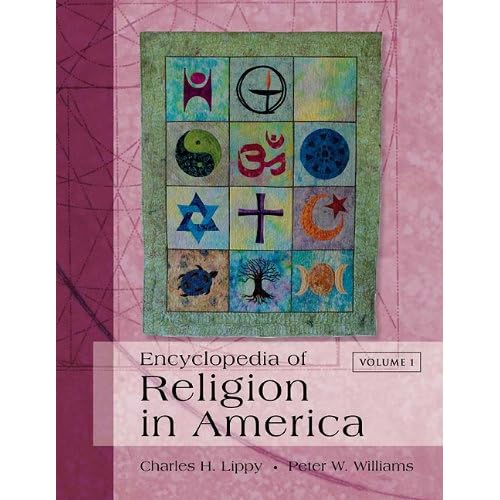
The 4-volume Encyclopedia of Religion in America is a comprehensive resource on the historical development and current state of religion in the US, Canada, Mexico and the Caribbean. It explores the origins, development and influence of various religions, sects, cults and movements with the broader cultural, economic, political and social world. Some topics covered include religion and the mass media, the environment and LGBT issues. Each volume includes both an alphabetical and thematic table of contents. The latter is helpful as it groups articles of related subject matter together for easier exploration of a topic.


Chase’s Calendar of Events with searchable CD-ROM

Reference GT 4803 C48 2010

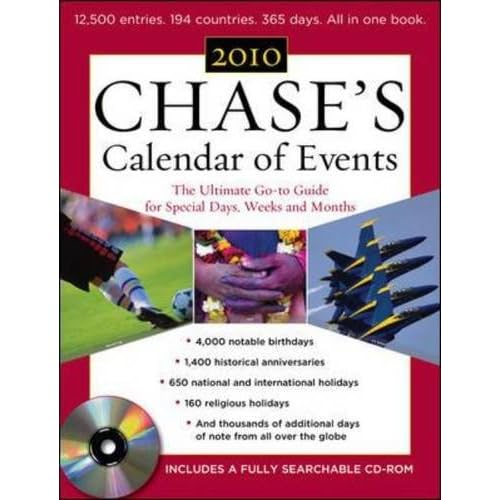
Chase’s Calendars of Events is the definitive source for special occurrences, holidays, anniversaries, birthdates, religious observances, sporting events, and more from around the world. Updated and published yearly since 1957, Chase’s has over 12,000 entries from 194 countries. 2010’s new entries included the birthdays of Michelle Obama and Lady Gaga; and events and dates of the 2010 Winter Olympics and FIFA World Cup. The book is laid out numerically by days and includes an alphabetical index. It also includes other features such as a Chinese calendar, list of wedding anniversary gifts, world time zones, Leap Seconds, list of names for the year’s hurricane season and a list of major awards presented that year.

Tuesday, December 14, 2010

New InterLibrary Loan form

There is a new version of the form for InterLibrary Loan requests available online.  This new form can be filled out on the computer and either printed or emailed (it will attach an xml document with the information to an email which will be sent to the library email address). Students and staff will need to include the citation information in the email or as another attachment when emailing, but you can begin using this now.

You can click on “Interlibrary Loan Request Form” to see the new form.  Or just see it here.

Happy holidays everyone!

Tuesday, November 2, 2010

National Novel Writing Month

November is National Novel Writing Month, the month long challenge to write your very own 50,000 word novel.
The library here has multiple useful resources for the dedicated novel writer.  Beyond mere unabridged dictionaries, we have style guides for grammar and both general and subject specific encyclopedias for that all important background information.  Both can be found in the reference room of the main library building.  To see what's available before making the trek over in weather like we're having today, you can peruse the library catalog in advance.

More resources are available online through NetLibrary.  If you haven't done so already, you can contact the library to set up an account to be able to access NetLibrary resources from home.  The resourceful novelist will find these sources extremely handy when trying to make their spaceships sound scientifically viable or their illiterate peasants period correct.

Most student researchers will already know how very useful it is to search in EBSCO to find current research for academic papers, but what you might not have realized is that we have a whole other resource for searching newspaper articles from across the globe.  If you're looking to base your court drama or tale of ciminal activity on real events, searching LexisNexis will help find the stories you can rip straight from the headlines.

Don't forget, while you're doing all this research for your novel, that you should still be avoiding plagiarism.  A novelist may not be citing works they use as inspiration, but they're not paraphrasing a source and calling it a novel.  Be aware of where your words end and theirs begin.  It's also a good habit to be in for the rest of your writing.  Try to keep a record of what resources you use and thank their authors when you're finished.

Good luck to anyone making the attempt.  I hope you'll all share your novel writing success stories in December. :)